
Cloud DMA for Arena Breakout Infinite
Cloud DMA is a central part of the supported Arena Breakout Infinite configuration. The ABI product lists it as required for full functionality on supported builds, making it an important part of understanding the complete setup.
Unlike traditional setups built around a second computer and physical external DMA hardware, the listed Cloud DMA configuration uses a single Windows PC with a Hyper-V-based virtual environment.
Understanding how this setup works, which Windows features it requires, and which additional services are needed makes the configuration much easier to plan.
What Is Cloud DMA for Arena Breakout Infinite?
Cloud DMA is the infrastructure layer associated with the supported ABI feature configuration. It provides the Hyper-V-based environment used by the listed product setup.
The key part of the design is its single-PC approach. The configuration is built around one gaming computer, rather than requiring a second physical tower or an external DMA box.
This makes it important to check the Windows edition, virtualization settings and required supporting services before planning the complete configuration.
Understanding the Single-PC Hyper-V Setup
Hyper-V is the virtualization technology used by the Cloud DMA setup. It provides the virtual environment on the same Windows PC used for the configuration.
CPU virtualization must be enabled in the system firmware. The listed requirements identify Intel VT-x and AMD-V as supported virtualization technologies.
Windows Pro, Enterprise and Education editions are recommended for the Hyper-V role. The specific Windows edition and its available virtualization features should be checked against the setup instructions.
Windows and Hardware Requirements
Cloud DMA lists Windows 10 and Windows 11 64-bit as supported operating system families. The configuration also requires several Windows security and virtualization features to be enabled.
- Windows 10 or Windows 11 (64-bit)
- HVCI enabled
- Core Isolation enabled
- TPM enabled
- Secure Boot enabled
- Intel VT-x or AMD-V virtualization enabled
- At least 8 GB RAM, with 16 GB recommended
- Stable broadband internet connection
- Ability to enable the Hyper-V role
Additional Services Required for Cloud DMA
Cloud DMA has several separately listed requirements beyond the Cloud DMA product itself. These services form part of the complete configuration and should be accounted for when reviewing the setup.
GREENWARD is identified as a separate required purchase. Static Server and AWS are also listed independently. Importantly, Static Server and AWS are two different products, and both are required.
Keeping these components clearly separated makes the purchasing process easier to understand and helps provide an accurate picture of the full configuration.
- GREENWARD — separate purchase required
- Static Server — separate purchase required
- AWS — separate purchase required
- Static Server and AWS are separate products
Cloud DMA Pricing and Lifetime Access
The Cloud DMA product currently lists lifetime access at $50. Its pricing is separate from the main Arena Breakout Infinite product.
The lifetime option is described as a one-time purchase for unlimited-duration access to the included Cloud DMA stack, subject to the applicable terms.
When comparing the complete ABI configuration, remember to account for GREENWARD, Static Server and AWS as additional required purchases.
Cloud DMA and the Complete ABI Feature Collection
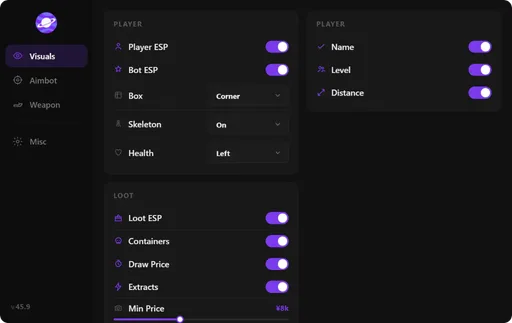
The main Arena Breakout Infinite product includes a collection of visual and aim-related settings. These include Player ESP, AI ESP, inventory and price information, corpse displays, FOV controls, smoothness, speed and target filters.
Cloud DMA is listed as required for full functionality on supported builds. Its setup requirements are therefore worth reviewing alongside the individual ABI product features and access plans.
Related pages
- Arena Breakout Infinite cheats and features
- Arena Breakout Infinite cheats pricing
- Explore ABI ESP settings

FAQ
Questions about this page
Answers tied to what you are reading—visit the FAQ page for every topic.