Player ESP
Visibility stack
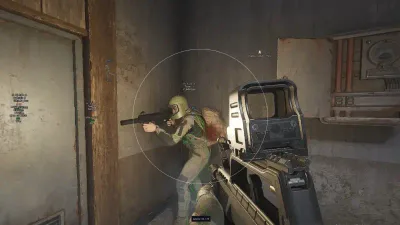
Boxes, skeletons, snaplines, nicknames, health and distance for Arena Breakout Infinite firefights.
- Player box and skeleton ESP
- Health bars and distance tags
- Drone and bomb ESP where listed

Explore player ESP, loot displays, aimbot settings and access plans for the PC version—summarized on this independent ABI Cheats site before checkout.
Windows PC
Platform
3
Plans
USD
Currency
Worldwide
Market
Cheat features
Aimbot, ESP, chams, and awareness tools from the current Arena Breakout Infinite listing—see dedicated pages for aimbot and ESP depth.
Visibility stack
Boxes, skeletons, snaplines, nicknames, health and distance for Arena Breakout Infinite firefights.
Visual highlights
Player and weapon chams plus stream-proof overlay options on supported builds.
Combat assist
FOV circle, head/chest selection, silent aim and aim line—tune before ranked play.
2D awareness
Compact radar beside ESP so you track threats and loot without covering the whole screen.
Weapon handling
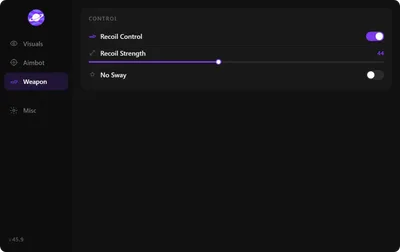
Tune recoil and spread options around your loadout instead of fighting every gun differently.
Windows PC
Windows 10 and 11 with the supported Steam or official client—confirm Cloud DMA notes before launch.
Readable HUD
Stream-friendly overlay modes, combat toggles, and color sets keep the menu usable in long sessions.
Save what you use
Menu keys, panic keys, and saveable profiles keep settings organized instead of enabling everything at once.
Shop
Main cheat plans, HWID Spoofer, and Cloud DMA license—three focused utilities for PC.
Why us
Plans, Cloud DMA, and HWID utilities stay on Arena Breakout Infinite PC with listed features only and support you can reach before checkout.
$35
Monthly plan
30-day Main product access billed in USD.
$150
Lifetime plan
One-time USD purchase for long-term cheat access while the product remains available.
$50
Cloud DMA license
Lifetime Hyper-V infrastructure license—add-ons priced separately.
Setup guide
Confirm compatibility, finish checkout, then follow delivery notes for Windows PC, Cloud DMA where required, and your saved cheat profile.
How it works
A straight path from reviewing Arena Breakout Infinite compatibility to a profile you can reuse every session.
4 steps
Read the PC requirements and Cloud DMA guides after any Arena Breakout Infinite or Windows update.
Select monthly, lifetime, Cloud DMA, or HWID Spoofer—each with its own checkout link.
Use delivery email notes for loader access, Hyper-V where listed, and supported clients.
Enable readable ESP and radar options first, then save configs once settings feel stable.
Guides
Review plans, Hyper-V setup, and PC requirements before you launch the cheat stack.


ABI FAQ
Pricing, Windows requirements, Cloud DMA and checkout—open the full FAQ for every topic.
Every raid in Arena Breakout Infinite is a different story. One moment you’re moving through a quiet building, and the next you’re deciding whether to push an enemy squad, search a valuable container, or make a quick exit with everything you’ve collected.
ABI Cheats brings together a collection of visual and combat features designed around the PC version of Arena Breakout Infinite. From player ESP and detailed inventory displays to configurable aimbot options, the available tools give you a range of settings to explore.
Whether you’re interested in tracking activity around the map, checking valuable loot, or customizing your aim settings, take a closer look at what the Arena Breakout Infinite cheat package includes.
Arena Breakout Infinite has plenty happening beyond what appears directly in front of you. Its environments contain players, AI-controlled enemies, equipment, containers, and valuable items that can all influence how a raid unfolds.
The ABI cheat package combines multiple visual options in one configurable interface. Choose the information you want to display, explore the available overlays, and arrange the interface around the details that interest you.
Player ESP, AI ESP, inventory information, distance indicators, health displays, weapon details, and corpse-value options provide different ways to view activity throughout a match.
Knowing what is happening around your current position is a major part of navigating Arena Breakout Infinite. The visual feature collection provides several ways to display player and AI information, allowing different elements to be identified through the available overlays.
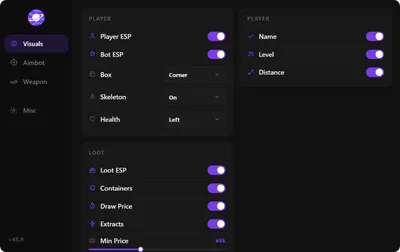
Player ESP includes options such as names, health bars, distance, weapon type, team index, view direction, skeletons, and snaplines. These displays can help organize the information visible on screen according to your preferred layout.
AI ESP is available as a separate visual option, making it easier to distinguish the different types of activity represented by the interface. Additional controls include boxes, head circles, and inventory lists.
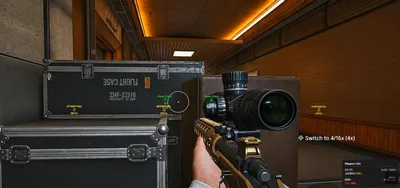
Searching for valuable items is one of the defining parts of Arena Breakout Infinite. Loot ESP adds another layer of detail to that experience by providing information about items, containers, and their displayed values.
Inventory price information and world visual options help make item-related information easier to review. Corpse ESP can also display price information, with settings for maximum distance and minimum value.
Instead of treating every item as equally important, the available price and distance options let you focus on the information you want to see during a raid.
The aimbot section provides its own collection of configurable settings. These include Field of View, smoothness, speed, maximum distance, and target filtering.
Additional options include visible checks, ignore-knocked settings, target lines, FOV displays, and custom mouse keybinds. Enable Akimbo is also included among the available options.
Each setting serves a different purpose within the configuration interface. The available controls allow the aimbot setup to be adjusted rather than relying on a single fixed configuration.
The Arena Breakout Infinite product supports Windows 10 and Windows 11 configurations listed on the product requirements page. A compatible Intel or AMD processor and an NVIDIA or AMD graphics card are also required.
The listed minimum memory requirement is 8 GB, with 16 GB recommended. The installation requires approximately 500 MB of available storage and a stable internet connection for authentication.
HVCI, Core Isolation, TPM, and Secure Boot are listed as enabled requirements. Supported launcher options include the official Arena Breakout Launcher, Steam, Microsoft Store, and Epic Games.
Cloud DMA is required for full functionality on supported builds. Review the dedicated Cloud DMA page for its Windows, Hyper-V, and additional service requirements.
The available Arena Breakout Infinite access options include monthly and lifetime durations. Monthly access is listed for 31 days, while the lifetime option provides unlimited-duration access under its listed terms.
Review the individual plan details and the Cloud DMA requirements before selecting your preferred configuration. This makes it easier to understand the included access period and the complete setup associated with the product.